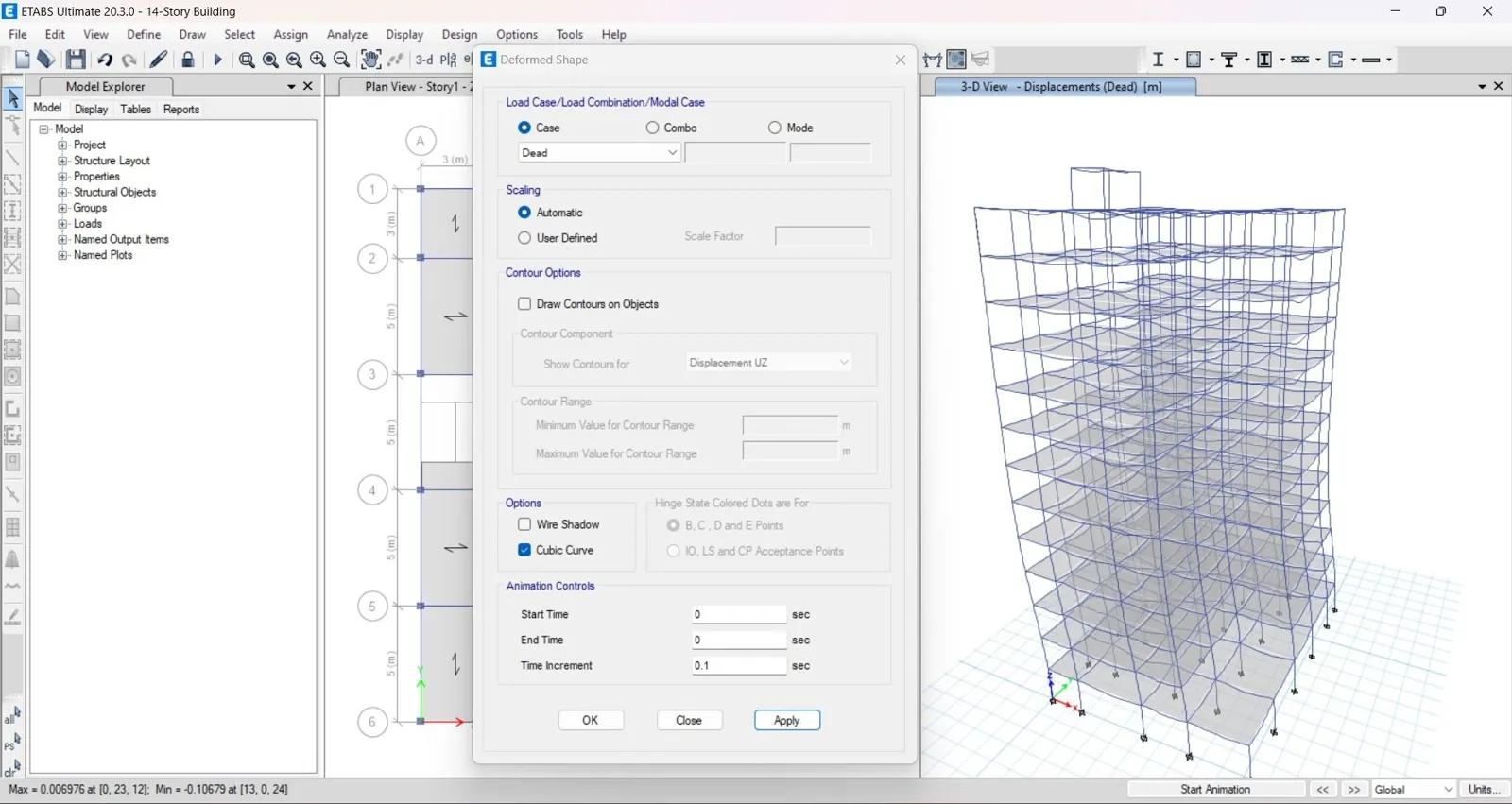
I once built a full 14-story model in ETABS — geometry, gravity, lateral, seismic, eccentricities, combinations — everything. I ran the analysis, and the structure deflected under gravity loads alone. Zero lateral load applied. The model wasn't unstable in the "I forgot supports" sense. Supports were correct. Diaphragms were assigned. Connectivity was clean. Load combinations were complete. So what was left?
The property modifiers. And that one checkbox — a small value sitting deep in the section properties dialog — was enough to make a stable structure behave like jelly. This post explains what actually happened, why the standard "code-based" cracked-section factors are easy to misuse, and how to debug this class of instability before it eats a day of your time.
What Are Property Modifiers, and Why Do They Exist?
Reinforced concrete is not elastic. Under load — especially lateral loads that push a column or beam toward cracking — the concrete section loses stiffness well before it loses strength. A column that behaves with full gross stiffness at low demand behaves with significantly reduced stiffness as cracking propagates.
Structural codes acknowledge this. Instead of modeling cracking explicitly (which would require nonlinear material models and much more computation), design codes allow — and often require — engineers to reduce the elastic stiffness of concrete elements using effective stiffness modifiers:
- Moment of inertia (I) — typically reduced to 0.35–0.7 of gross, depending on element type and code.
- Shear area — typically reduced to 0.4–0.8 of gross.
- Torsion constant (J) — often reduced to 0.1–0.5, sometimes much lower, especially for cracked sections.
ETABS applies these as multipliers. A modifier of 0.7 means "use 70% of the gross section property." Sounds simple. The trap is that a multiplier applies to the computed gross property, which depends on section dimensions. For a large section, 0.7 still leaves plenty of stiffness. For a modest section, 0.7 — combined with 0.6 shear and a low torsion value — can leave almost nothing.
Why Gravity Deflection Is the Tell
The clearest diagnostic symptom is what happened in my model: the structure deflected under gravity alone. No lateral load. No seismic case. Just dead and live load. A model that deflects under its own weight is telling you one of three things:
- Connectivity or support issue — the structure is genuinely unstable as modeled.
- Diaphragm or constraint issue — nodes are free to move when they shouldn't be.
- Stiffness issue — the sections are too soft to resist gravity in a realistic way.
In my case, the first two checked out. That left stiffness — and specifically, the modifiers.
Here's the crucial point that took me too long to internalize: for gravity load cases, most codes and modeling conventions assume uncracked sections. Cracking in RC elements is primarily driven by lateral demand — flexural cracking at the ends, shear cracking under cyclic loading. Under pure gravity, a well-detailed column is usually still behaving within its uncracked stiffness range.
So if your modifiers are applied to all load cases — including gravity — you're telling ETABS "this column is cracked before any lateral load is applied." That's not physically correct, and it will produce deflections under gravity that don't match reality.
The Fix Isn't Always "Bigger Numbers"
When I revised the modifiers in my model, I moved from I = 0.7 / shear = 0.6 to I = 0.8 / shear = 0.8 / torsion = 0.5. The structure stabilized. Realistic drifts. Clean modal shapes. Good outcome.
But it's worth being honest about why it worked, because the answer matters more than the number:
- The revised values gave the sections enough remaining stiffness to resist gravity in a way consistent with the geometry.
- The revised values are still within the range that's defensible for preliminary design under seismic loading.
- The instability was as much about where the modifiers were applied (which load cases) as about what values were used.
The intellectually honest takeaway: if you're choosing modifier values, choose them per load case, not globally. Apply reduced stiffness to the seismic cases. Keep gravity and modal cases closer to uncracked behavior. This is how most codes intend the modifiers to be used, and it's what avoids the "gravity deflection" class of instability entirely.
How to Debug This Class of Instability in Minutes, Not Hours
If you hit structural instability in ETABS and gravity deflection is the symptom, run this checklist in order:
- Check the analysis log. ETABS will often tell you which node or mode diverged. It's rarely specific, but it eliminates whole categories of causes.
- Verify supports and restraints. Fast to check, common to overlook.
- Verify diaphragms and constraints. A missing diaphragm can look identical to a stiffness problem.
- Isolate the load case. Run gravity alone with no other cases. If it deflects, you've found your symptom.
- Reset all modifiers to 1.0 and rerun. If it stabilizes, the modifiers are the cause. If it doesn't, the problem is elsewhere — geometry, connectivity, or the load cases themselves.
- Reapply modifiers per load case, not globally. Seismic cases get reduced stiffness. Gravity and modal cases stay closer to uncracked.
- Check section sizes. If pre-dimensioning was skipped, or if the sections are unusually small for the building height, no modifier combination will save the model.
Steps 5 and 6 are the ones that typically solve the problem. Steps 1 through 4 exist to make sure you don't waste an afternoon chasing a stiffness issue that was actually a connectivity issue in disguise.
What I Took Away From This
Three lessons, in order of how long they took to learn:
- Modifiers are per-case, not global. A value that's correct for seismic can be physically wrong for gravity. ETABS doesn't stop you from applying them globally — but you shouldn't.
- Gravity deflection under no lateral load is a stiffness red flag. It tells you the model's stiffness — not its geometry or its boundary conditions — is the problem.
- Pre-dimensioning isn't optional. Every commenter who pushed back on my original post about column sizing had a point. A well-proportioned building rarely produces instability just because someone picked 0.7 instead of 0.8.
Instability in ETABS is rarely mysterious once you know which lever to pull. The hard part isn't fixing it — it's knowing where to look. I hope this saves someone the day I spent on it.
If you've run into a similar issue — or have a different approach to setting modification factors for preliminary design — I'd be glad to hear how you handle it. Get in touch.
Discussion
0 commentsPlease log in to join the discussion.
No comments yet
Be the first to share your thoughts!